

How to Remove Email Spam Filters in DirectAdmin
You can remove email filters from your DirectAdmin account.
1. Log in to your DirectAdmin Account.
2. In the E-mail Manager section, click on SPAM Filters or type SPAM Filters in the navigation filter box, and the option will appear. Click on it.
3. Under Block By, choose the filters you want to remove.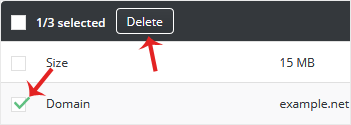
4. Click on Delete. It will prompt for confirmation. Click on Delete again.
Your selected email filters will be successfully removed.



 English
  phone
phone
 Whatsapp
 Quote
Quote